Chevron Geospatial market research
From market questions to usable location data.
- Role
- Contract Product Manager
- Timeline
- 2025 · 8 weeks
- Delivered
- Research workspace + data pipeline
- Stack
- Next.js · FastAPI · RabbitMQ
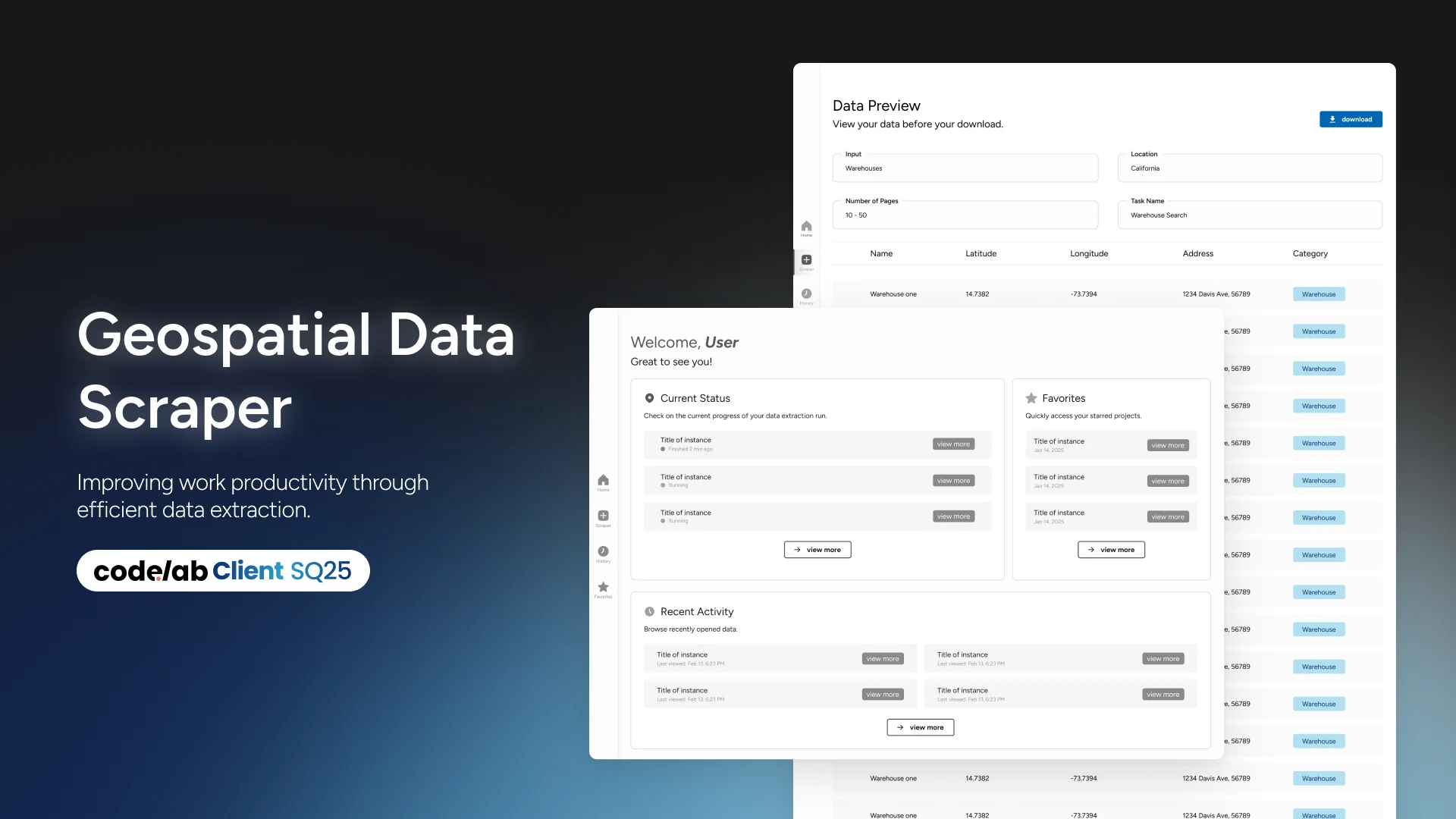
We turned manual market research into a repeatable workflow by connecting search scope, data quality, and an Excel-ready handoff for analysts and sales teams.
- A market question translated into a repeatable research workflowStart with the opportunity
- Company and regional searches in one configurable flowSee the search controls
- Validation and preview before the Excel handoffFollow the data
- Hours to seconds, as reported in the team's project writeupRead the outcome
01 · The opportunity
Start with the next fueling market.
Before the renewable natural gas (RNG) team could assess a new fueling market, analysts had to find the businesses that might use it. They looked for companies with large fleets around logistics hubs, collecting addresses by hand and combining them with a paid research tool. Missing records and inaccurate addresses added cleanup to an already slow process.
We organized the product around the work that followed that question: define a region, find relevant businesses, inspect the results, and take them into analysis. Across the eight-week engagement, our CodeLab team connected those steps in one workspace. That gave both analysts and sales teams a repeatable way to gather the location data behind an expansion decision.
02 · Search scope
Let the question set the search area.
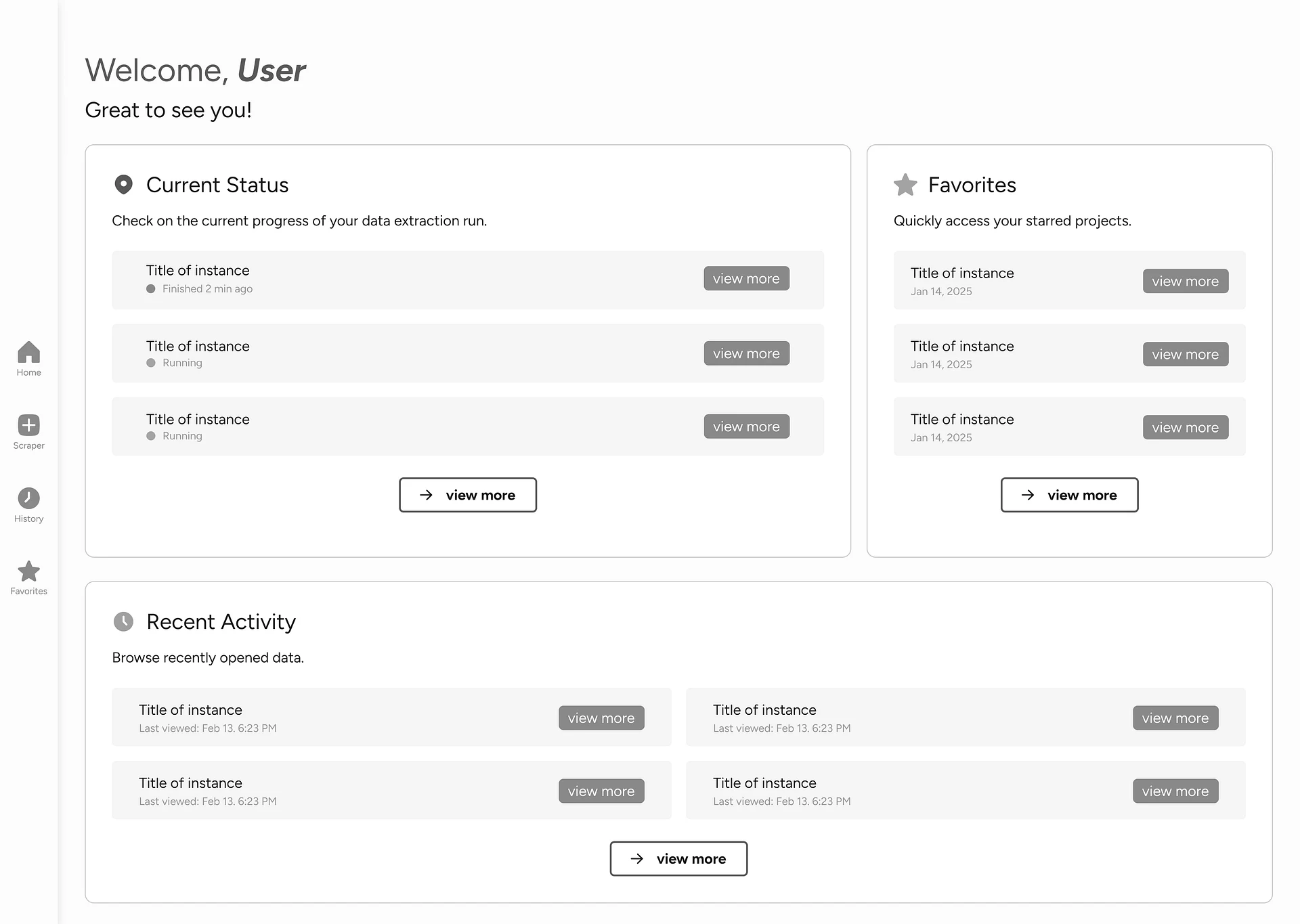
An analyst scanning a new market starts with a region and a business category. A sales team investigating a prospect may already know the company. We gave both users a direct path into the same search: enter a company name or select business types, then choose the geography.
We kept national coverage and local precision in the same configuration flow. Users could search the continental United States or narrow the work to a city or metropolitan area. Behind those controls, the scheduler broke the request into ZIP-code tasks. The interface let users express the scope in terms they knew while the system handled how to collect it.
We also brought the handoff forward: users could name the exported file and request an email notification before starting. That let them set up the research and return to the result when it was ready.
03 · Return to results
Keep the next action beside the research.
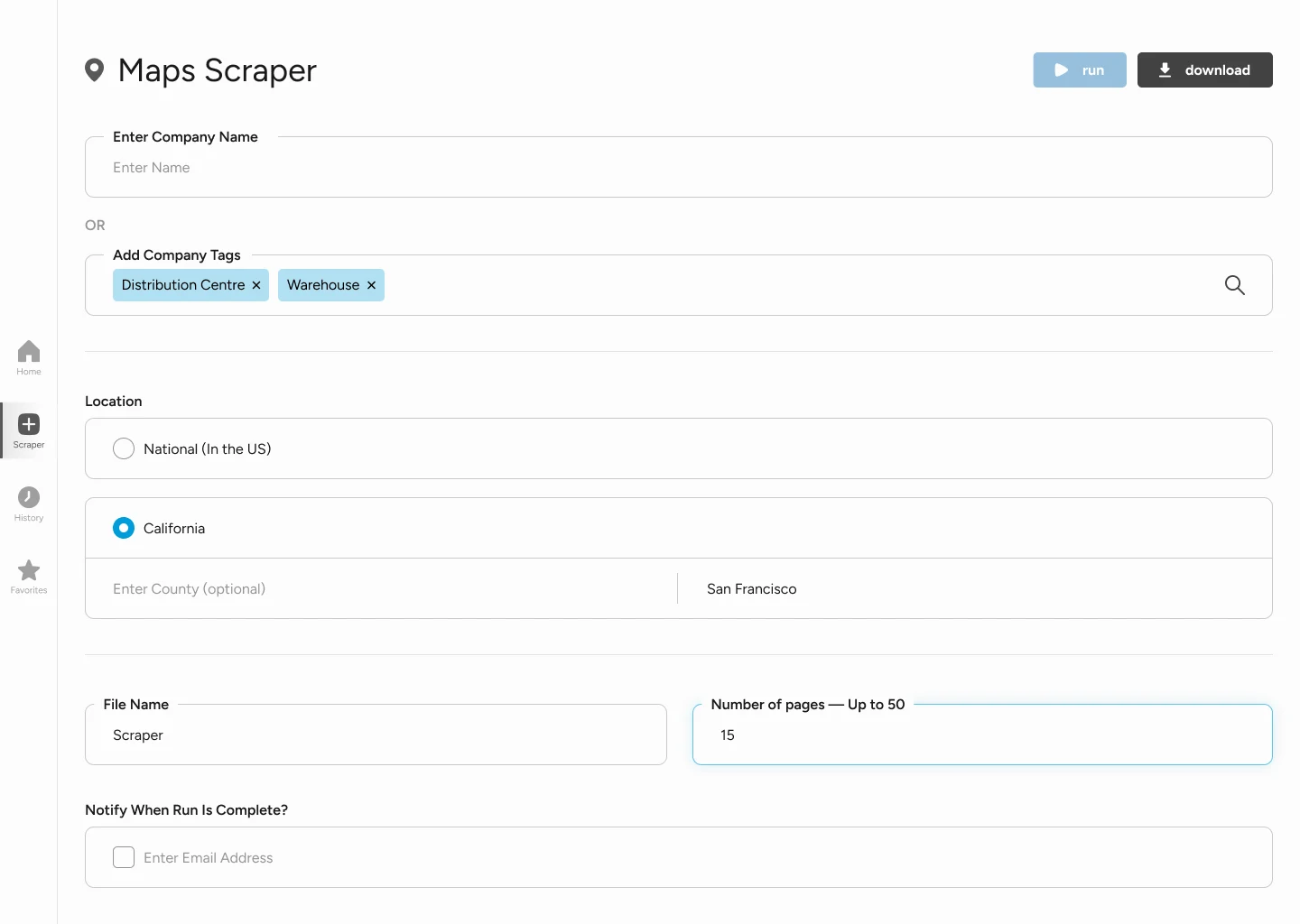
Starting a search was only part of the job. People also needed to check progress, revisit useful research, and retrieve a finished dataset. We put active jobs, favorites, and recent activity on the dashboard so returning users could pick up their work from one place.
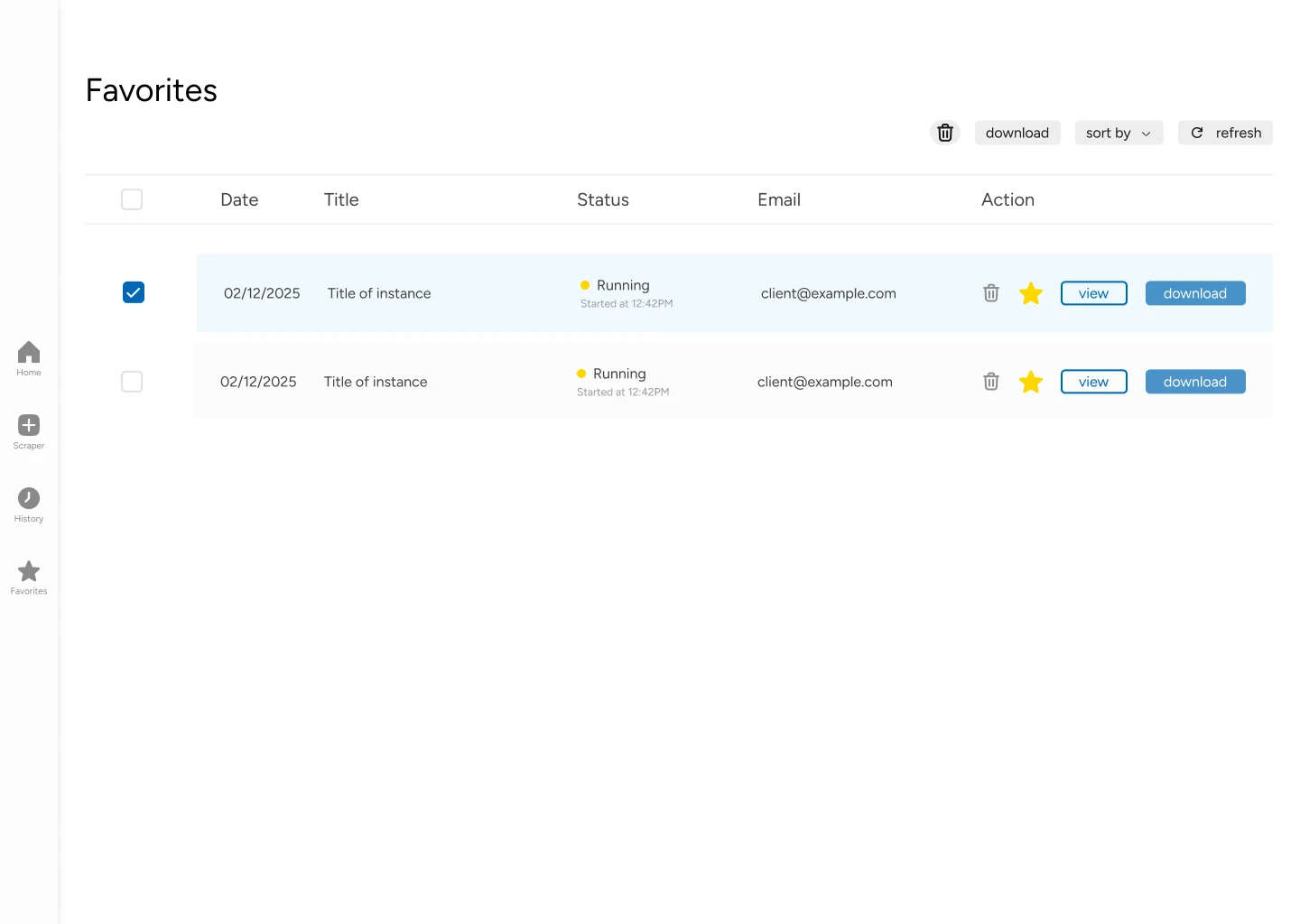
For history and favorites, we chose tables that could accommodate the volume of jobs different departments might run. We placed preview, favorite, and download actions beside each record, keeping routine retrieval close to the result. Engineering supported that choice with TanStack Table: the column-based interface mapped naturally to the structured data in PostgreSQL and the spreadsheets users would receive.
Engineering noteUse the data's structure to simplify the interface
We chose TanStack Table because the research records already had a tabular shape. That alignment reduced the work needed to present job data and kept the interface familiar for spreadsheet users.
- Next.js renders the research workspace; Tailwind CSS supplies the styling layer.
- The frontend exchanges requests with FastAPI over HTTP/HTTPS.
- PostgreSQL records, table columns, and Excel output share a structured, field-based format.
04 · Usable data
Build the quality checks into the handoff.
Every irrelevant business or duplicate address would send cleanup work back to the analyst. We built that preparation into the pipeline: filter records by business tags, resolve duplicates, and validate addresses and ZIP codes before preparing the export.
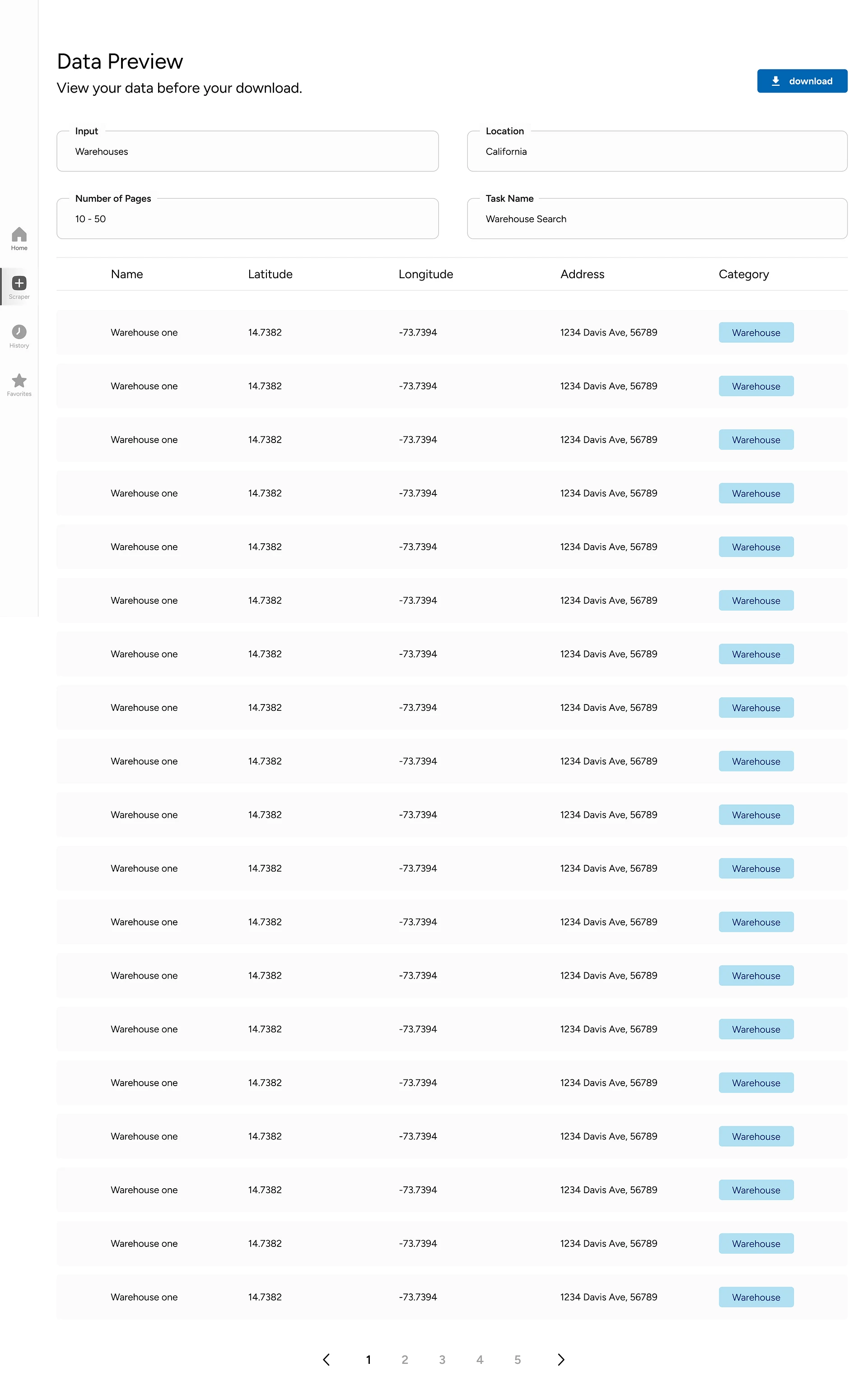
We paired those checks with a preview users could inspect themselves. The design mirrored Excel, adding space and category tags to make the records easier to scan. Users could review the collected fields in the context of their search before taking the dataset into their own analysis.
We generated the Excel file when someone requested a download, and designed a loading indicator for that preparation step. The result joined collection, inspection, and export in a single workflow while keeping the final handoff in a tool the team already used.
Engineering notePrepare the spreadsheet at download time
The ZIP Data Management Service uses pandas to process the collected records. We kept filtering and export preparation in that service so users received a consistent table when they downloaded a job.
- Business-tag filters remove irrelevant entries; validation checks key location fields and resolves duplicates.
- The export path converts PostgreSQL data into an Excel-ready table on demand, without a separate object-storage layer.
- The download indicator makes the file-generation wait visible in the interface.
05 · Delivery
Scale the collection. Fit the client's environment.
Offering a national search made collection speed an engineering problem we had to address directly. We split the work across Puppeteer collectors and used RabbitMQ to distribute ZIP-code tasks. The queue separated scheduling from execution, letting workers process tasks in parallel and return failures for retry. A broad search could use the same product flow as a local one while drawing on more collection capacity underneath.
We also designed for the people who would maintain the system. Client architects told the team they were less familiar with some newer tools, so we chose PostgreSQL to fit their existing stack and prepared containerized services for Azure. That kept infrastructure fit part of the delivery plan. The published account describes Azure Kubernetes Service deployment as the next step.
Engineering noteHow a research request becomes a dataset
We separated the request, collection, and data-preparation stages. The diagram follows a job through those services, with shared state and failure recovery shown below.
- Next.jsResearch workspaceChoose a company or category and a search region.
- FastAPIApplication APIReceive the request and manage the job.
- Task generationJob schedulerBreak the search into ZIP-code tasks.
- RabbitMQTask queueHold and distribute work to available collectors.
- RabbitMQTask queueRelease queued tasks to the worker pool.
- PuppeteerParallel collectorsGather business-location records across workers.
- pandasZIP data serviceFilter, deduplicate, and validate the records.
- Preview + ExcelResearch handoffInspect the results and generate a file on request.
- Shared state
- FastAPI ↔ PostgreSQLUser records, job metadata, and system state.
- Data management
- FastAPI ↔ ZIP data serviceThe backend manages ZIP-level data alongside collector input.
- Failure recovery
- Collectors → RabbitMQFailed work returns for retry or logging.
- FastAPI handles user requests, accesses PostgreSQL through an ORM, and asks the scheduler to create collection tasks.
- RabbitMQ distributes tasks across Puppeteer workers; failed work returns to the queue for retry or logging.
- The ZIP Data Management Service accepts input from the backend and collectors, then prepares validated records for export.
1Schedule the research
2Collect and prepare the results
Engineering notePrepare a deployment the client can operate
We used the client's PostgreSQL and Azure environment as delivery constraints. Docker containers separated the collectors and supporting services, preparing them for an AKS deployment.
- The proposed deployment placed the queue and scraper pods in the cluster, with Kubernetes coordinating workloads and scaling.
- Independent services let the infrastructure team adjust collection capacity as search volume grew.
- AKS autoscaling and the production cloud rollout remain planned capabilities in the published source.
06 · Outcome
Less time collecting. More room to evaluate.
We delivered a path from a market question to a dataset the team could inspect and use. CodeLab reports that the system reduced research from hours to seconds. The article does not publish benchmark conditions or measured cost savings, so I treat that as the team's reported result.
This work reinforced how closely product, design, and engineering depend on each other. Regional controls defined the work the scheduler had to distribute. The table design made completed research accessible. Validation and Excel export carried that work into the team's next decision. Each choice addressed a different part of the same research task.